Before you start
- Your store is online and you have delivered at least one order.
Customer reviews are your best social proof: they reassure future buyers and boost your sales. Your customers can leave a rating and a comment after receiving their order — it's up to you to enable and then monitor them.
What you'll learn
- Enable reviews on your store.
- Track your satisfaction metrics.
- Moderate reviews and react to unhappy customers.
Step by step
Step 1 — Enable reviews
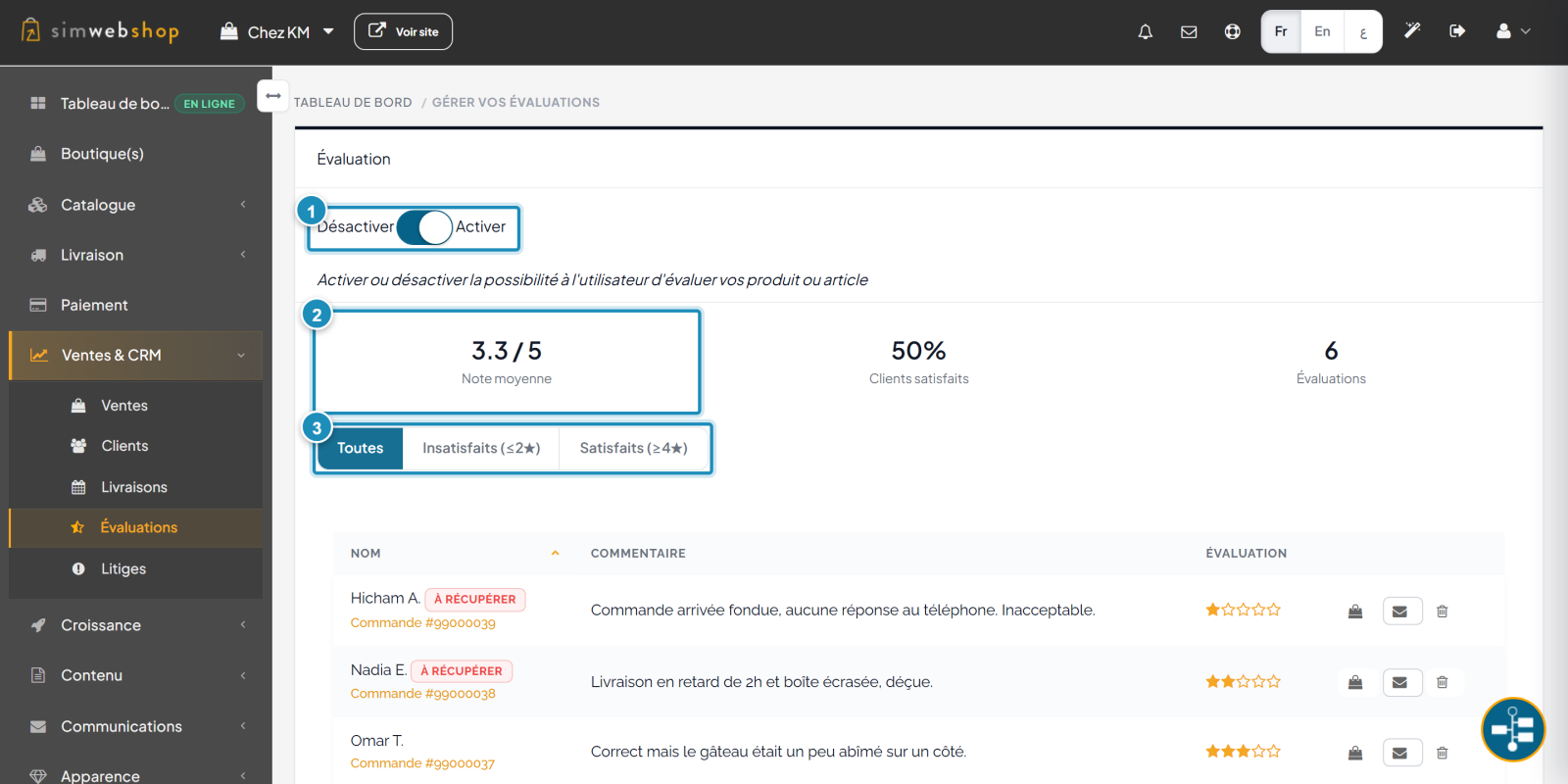
In the left-hand menu, open Sales & CRM then Reviews. At the top, the toggle (marker ①) turns your customers' ability to rate your products on or off. Just below, your metrics (marker ②) sum things up: average rating, % of satisfied customers and number of reviews. The filters (marker ③) let you show all reviews, or only the unsatisfied (≤2★) and satisfied (≥4★).
Step 2 — Moderate and react
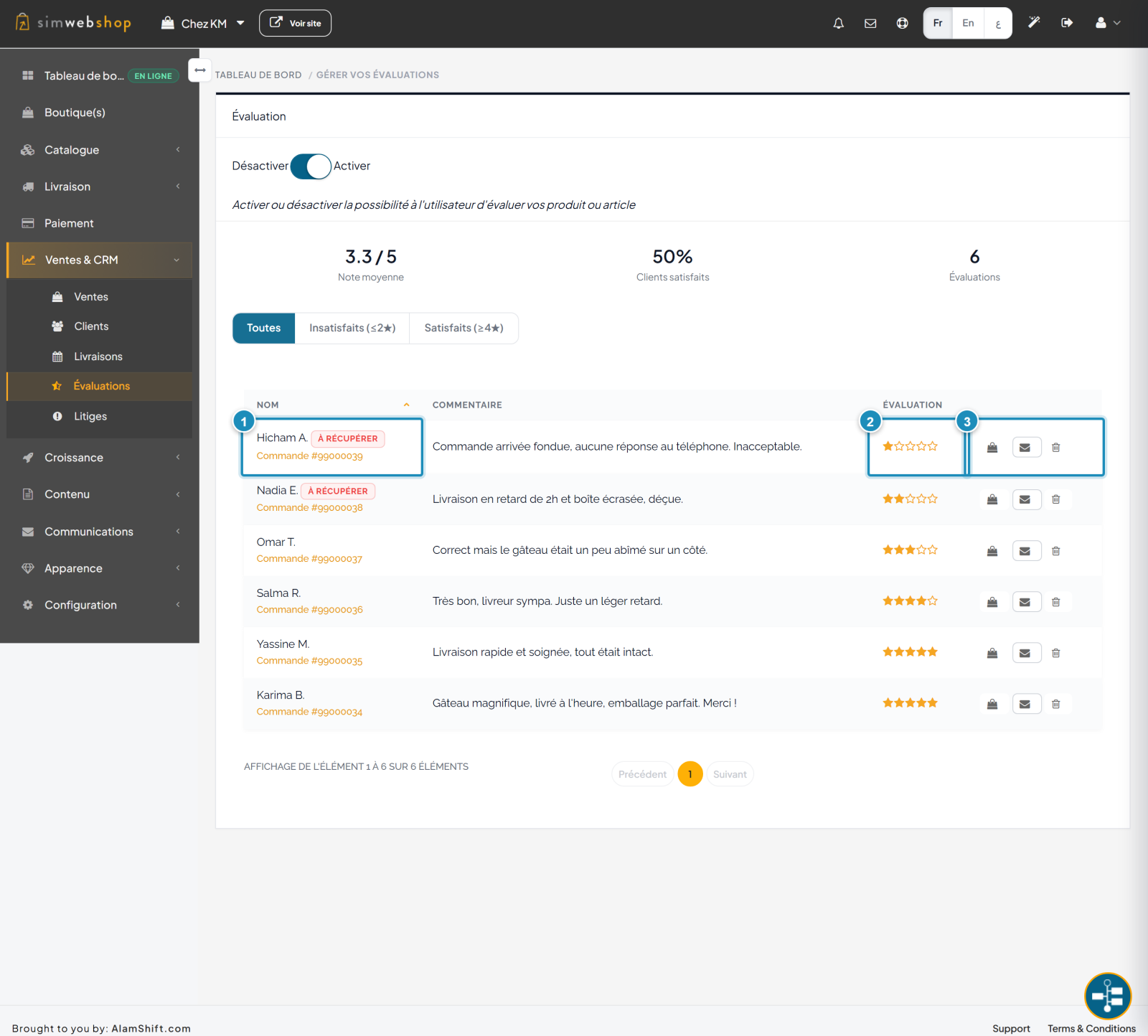
The list shows each review (marker ①) with the customer's name, their comment and the order concerned. Unhappy customers are flagged with a "To win back" badge. The Rating column (marker ②) shows the star rating. On the right, the actions (marker ③) let you view the order, contact the customer by email or delete a review.
Expected result
Reviews are enabled and appear on your product pages. You track your average rating and satisfaction rate, and you can reach out to unhappy customers to win them back.
Expert tips
- React fast to unhappy customers. The "To win back" badge and the Unsatisfied filter show your priorities.
- Thank satisfied customers. A word of thanks strengthens loyalty.
- Don't cheat. Fake reviews are spotted and destroy trust; rely on authentic ones.
- Aim for volume. A few dozen reviews reassure far more than one perfect isolated rating.
Common mistakes
| Mistake | Why it's a problem | The fix |
|---|---|---|
| Leaving reviews disabled | You lose a decisive trust signal. | Turn on the toggle at the top of the page. |
| Ignoring negative reviews | The unhappy customer leaves and speaks ill. | Contact them via the email action ("To win back"). |
| Deleting criticism | A 100% 5★ store looks suspicious. | Reply rather than delete. |
| Never checking the page | You miss satisfaction signals. | Visit Reviews regularly. |
Frequently asked questions
When can my customers leave a review?
After receiving their order. The review reflects their real experience, which guarantees its authenticity.
Where do reviews appear?
Once enabled, reviews appear on your product pages on the storefront, as a rating and comments.
What does the "To win back" badge mean?
It flags an unhappy customer (low rating) worth contacting to solve their issue and keep them loyal.
Can I delete a review?
Yes, via the delete icon. Reserve it for abusive or off-topic reviews: for a legitimate negative review, it's better to reply to the customer.
How do I contact a customer who left a review?
Use the email action on the review's row to write to them directly and resolve the situation.