Before you start
- Your store is online with at least one product to sell.
A coupon is a promo code your customers enter at checkout to get a discount. It's a simple, powerful marketing lever: welcome offers, clearance, loyalty, seasonal campaigns… Create one in 3 minutes.
What you'll learn
- Create a coupon and choose its discount type.
- Set its rules (expiry, usage limit).
- Track and enable your coupons.
Step by step
Step 1 — Open coupon management
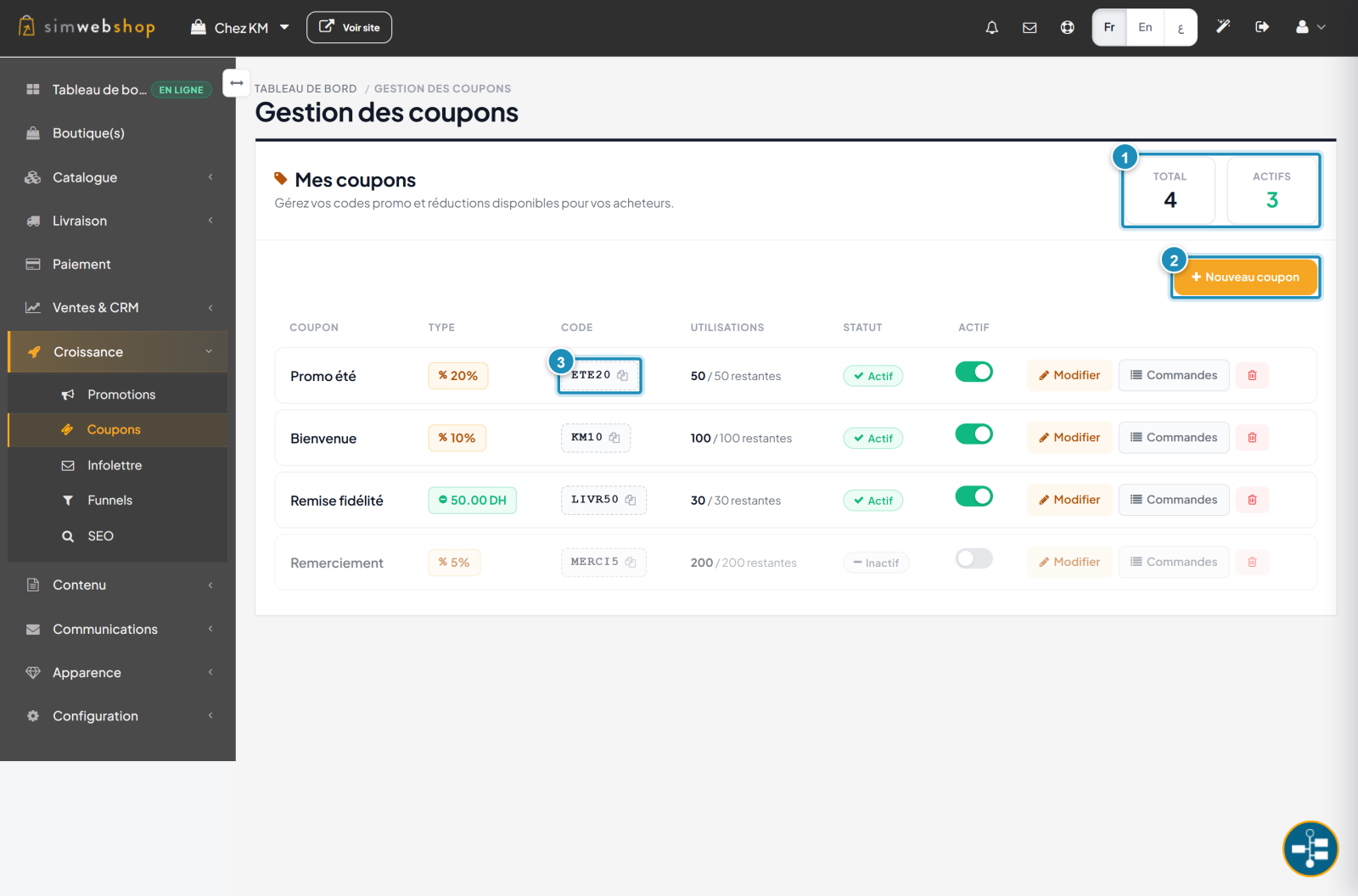
In the left-hand menu, open Growth then Coupons. At the top, the metrics (marker ①) show the total number of coupons and how many are active. The "New coupon" button (marker ②) starts the creation. Each row shows the code (marker ③) — the one the customer types — its type, remaining uses, status and a toggle to enable/disable it.
Step 2 — Create your coupon
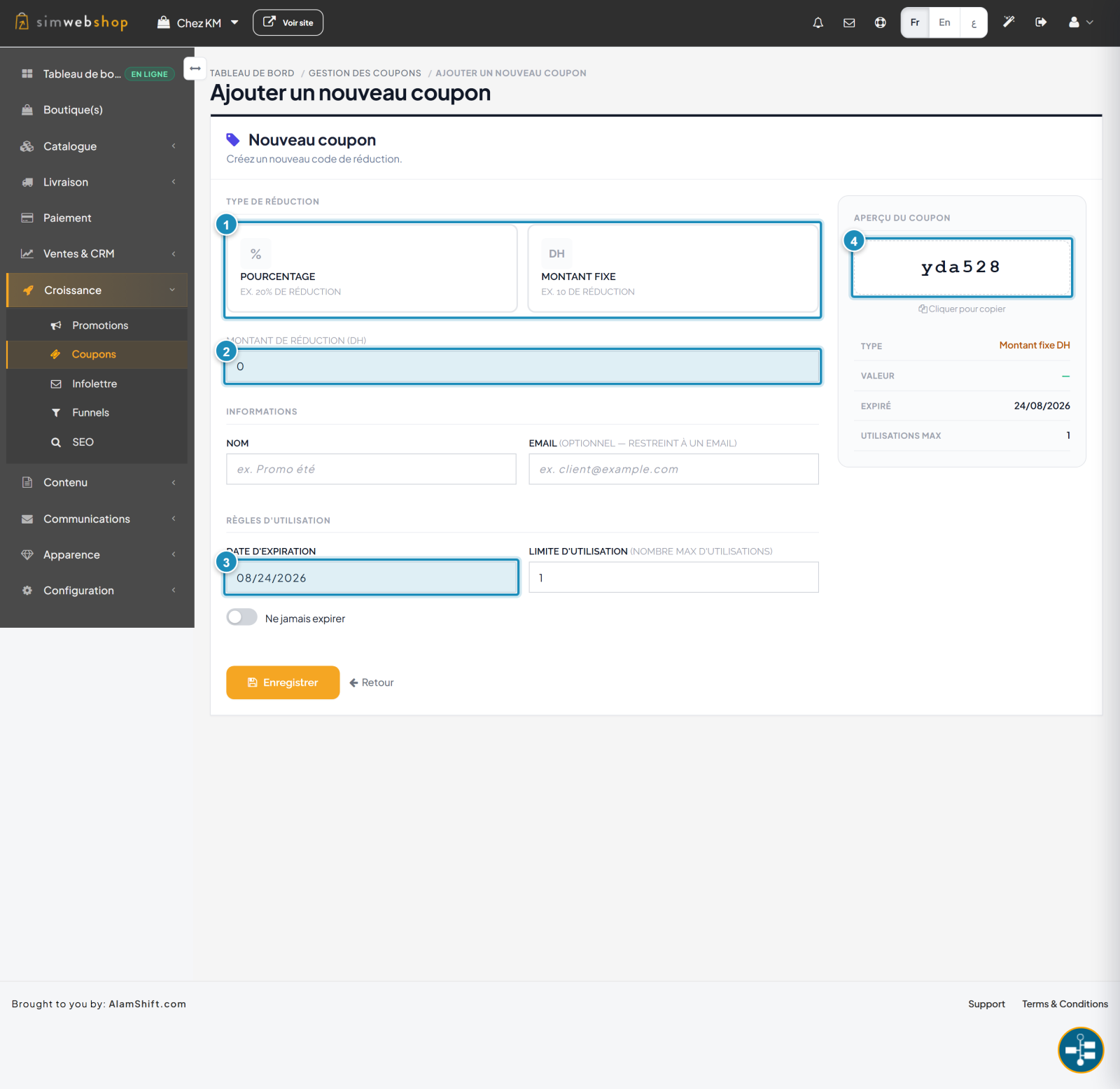
First choose the discount type (marker ①): Percentage (e.g. -20%) or Fixed amount (e.g. -50 DH). Then enter the discount value (marker ②). Under Usage rules (marker ③), set an expiry date and a usage limit (or turn on "Never expire"). The code is generated automatically and shown in the preview (marker ④) — you can copy it. Click Save.
Expected result
Your coupon is created and active. Its code appears in the list, ready to share with your customers (email, social media, banner). As soon as a customer enters it at checkout, the discount applies automatically.
Expert tips
- Choose a simple code. Short and memorable (e.g. SUMMER20, THANKS10): easier to communicate.
- Create urgency. A near expiry date encourages ordering right away.
- Limit uses. Frame your promo budget with a usage limit.
- Communicate the code. A coupon is useless if it's not shared: email, banner, social.
Common mistakes
| Mistake | Why it's a problem | The fix |
|---|---|---|
| Complicated code | The customer mistypes it. | Use a short, clear code. |
| No date or limit | The coupon can be overused and erode your margins. | Set an expiry and a usage limit. |
| Forgetting to enable | The code doesn't work for customers. | Check the "Active" toggle in the list. |
| Not communicating the code | Nobody uses it. | Share it by email, social and on the store. |
Frequently asked questions
Where does the customer enter the code?
In their cart, when finalizing the order. The discount then applies automatically to the total.
Percentage or fixed amount: which to choose?
A percentage (e.g. -20%) scales with the cart total; a fixed amount (e.g. -50 DH) gives a constant discount. Choose based on your goal.
Can I disable a coupon without deleting it?
Yes. Use the Active toggle on its row: the code stops working but stays saved.
How do I limit the number of uses?
When creating it, set the usage limit. Once reached, the coupon is no longer valid.
What's the difference from a promotion?
A coupon requires a code entered by the customer. A promotion (Growth → Promotions menu) applies automatically, with no code.