Before you start
- Your store is online with at least one payment method configured.
The loyalty program automatically rewards your buyers: each delivered order makes them earn points, converted into a discount coupon once a threshold is reached. A powerful lever to bring customers back — far cheaper than acquiring new ones.
What you'll learn
- Set the points earned, the threshold and the reward.
- Choose the payment methods that earn points.
- Activate the program and check the real-time preview.
Step by step
Step 1 — Set the earn rate, threshold and reward
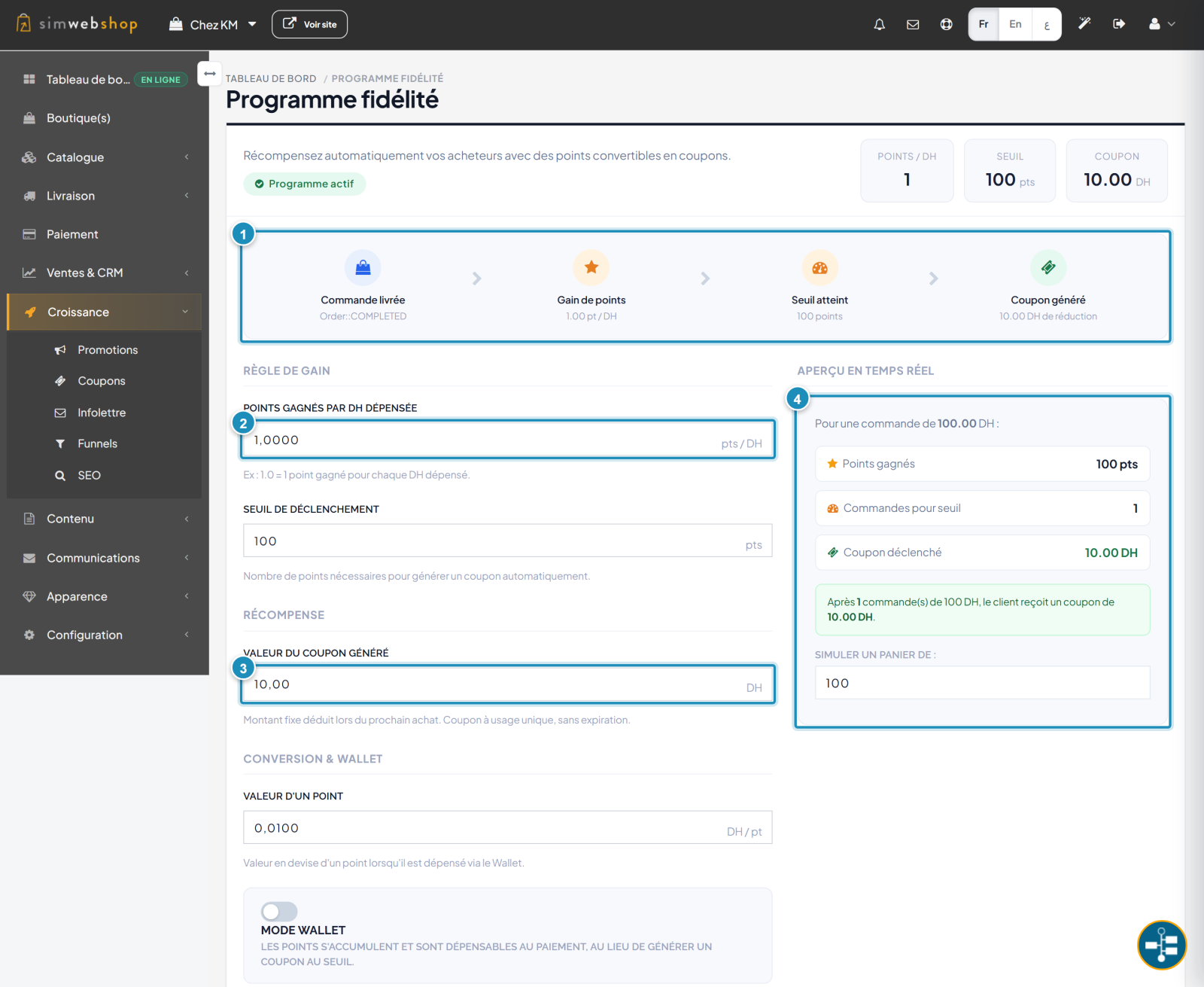
In the left-hand menu, open Growth then Loyalty. The flow (marker ①) sums up the mechanic: a delivered order makes the buyer earn points, the threshold reached generates a coupon. Set the points earned per unit spent (marker ②) — the accrual rate. Just below, the trigger threshold sets the number of points needed. The generated coupon value (marker ③) is the reward offered. The real-time preview (marker ④) simulates the result for a given cart.
Step 2 — Choose the methods and activate
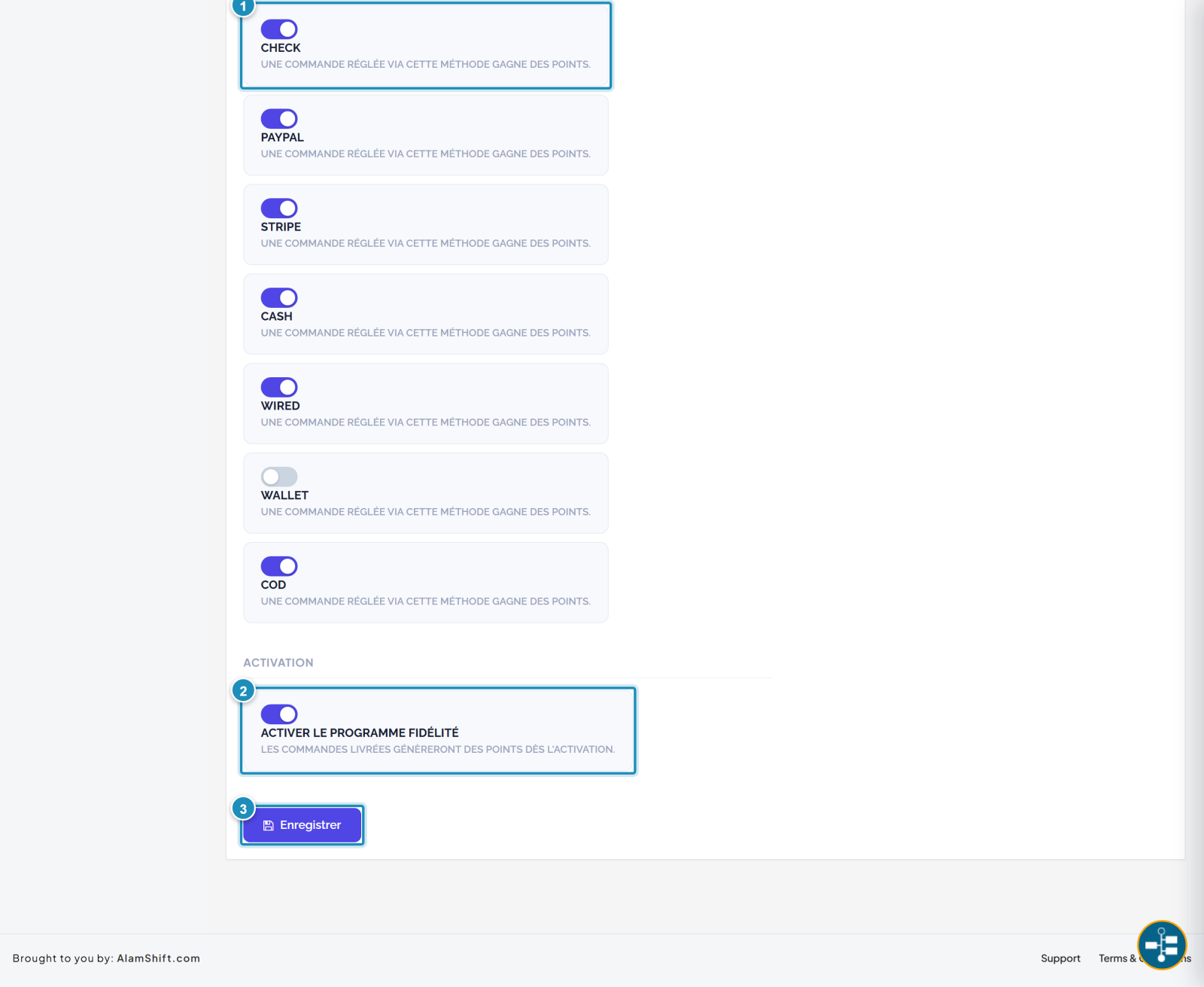
Further down, the Methods that earn points section (marker ①) lets you turn earning on or off per payment method: an order paid via a checked method earns points. Finally, the Activate the loyalty program toggle (marker ②) switches everything on: from activation, delivered orders generate points. Click Save (marker ③).
Expected result
The badge switches to Program active. On each delivered order, your buyers accumulate points; once the threshold is reached, a discount coupon is generated automatically — with no action on your part.
Expert tips
- Keep it simple at first. A clear ratio ("1 point per unit, coupon after 100") is easier for your customers to grasp.
- Promote the program. Mention it on your store and in your emails so it gets used.
- Watch profitability. The coupon value should stay a reasonable fraction of the average cart.
- Points on delivery. Points are credited when the order is delivered, not at purchase — this reduces fraud.
Common mistakes
| Mistake | Why it's a problem | The fix |
|---|---|---|
| Program not activated | No points are credited. | Activate "Loyalty program" and save. |
| Threshold too high | The customer never reaches the reward. | Adjust threshold and earn rate via the preview. |
| Coupon too generous | Program not profitable. | Keep the coupon proportional to the average cart. |
| All methods off | No order earns anything. | Enable at least your main methods. |
Frequently asked questions
When are points credited?
When the order is delivered (completed status), not at payment time. A cancelled or disputed order earns no points.
What's the difference between Coupon mode and Wallet mode?
In Coupon mode, a discount coupon is generated once the threshold is reached. In Wallet mode, points accumulate and are spent directly at checkout, like a balance.
Does the coupon expire?
The generated coupon is single-use and has no expiry: it's deducted on your customer's next purchase.
Can I exclude certain payment methods?
Yes. In Methods that earn points, turn off earning for a method: orders paid that way will no longer earn points.
Can the customer see their points?
Yes. Once the program is active, the buyer checks their points balance from their account on your store.