Before you start
- Your store is online with a few products and categories published.
SEO (search engine optimization) determines how well your store ranks on Google. SimWebShop already applies the technical best practices automatically (clean URLs, tags, sitemap, structured data). All that's left is to complete a few settings to gain points and polish how your pages appear in search results.
What you'll learn
- Read your SEO score and spot what's missing.
- Set a fallback title and description for your pages.
- Follow the Google preview and the 4 SEO steps.
Step by step
Step 1 — Read your SEO dashboard
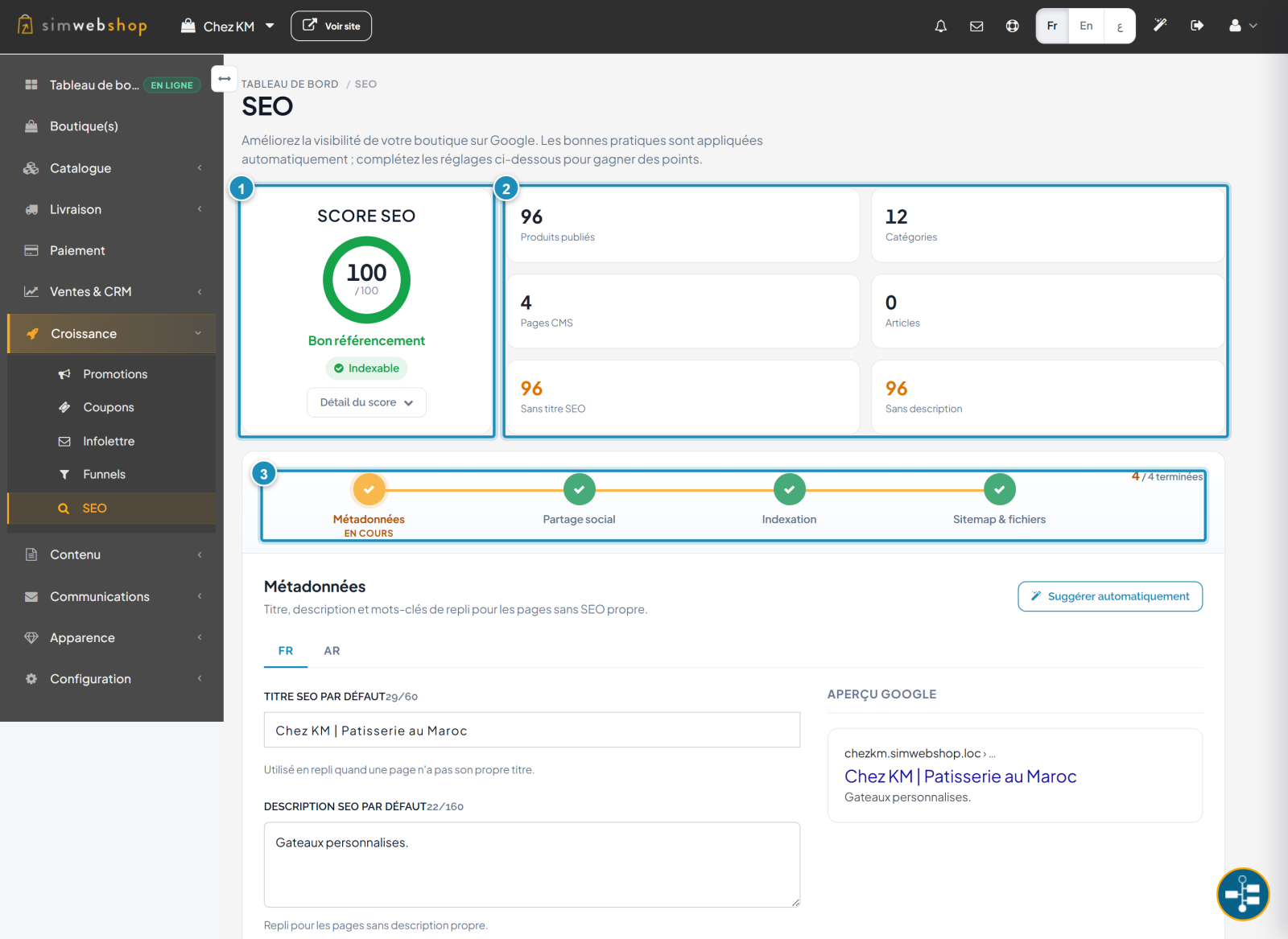
In the left-hand menu, open Growth then SEO. The SEO score (marker ①) sums up the health of your ranking out of 100, with an Indexable badge confirming Google is allowed to index your store; the Score detail button lists the points earned and still to earn. The indicators (marker ②) count your products, categories, pages and — most importantly — how many pages are Without SEO title or Without description (in orange). The 4-step track (marker ③) guides you: Metadata → Social sharing → Indexing → Sitemap & files.
Step 2 — Set your fallback metadata
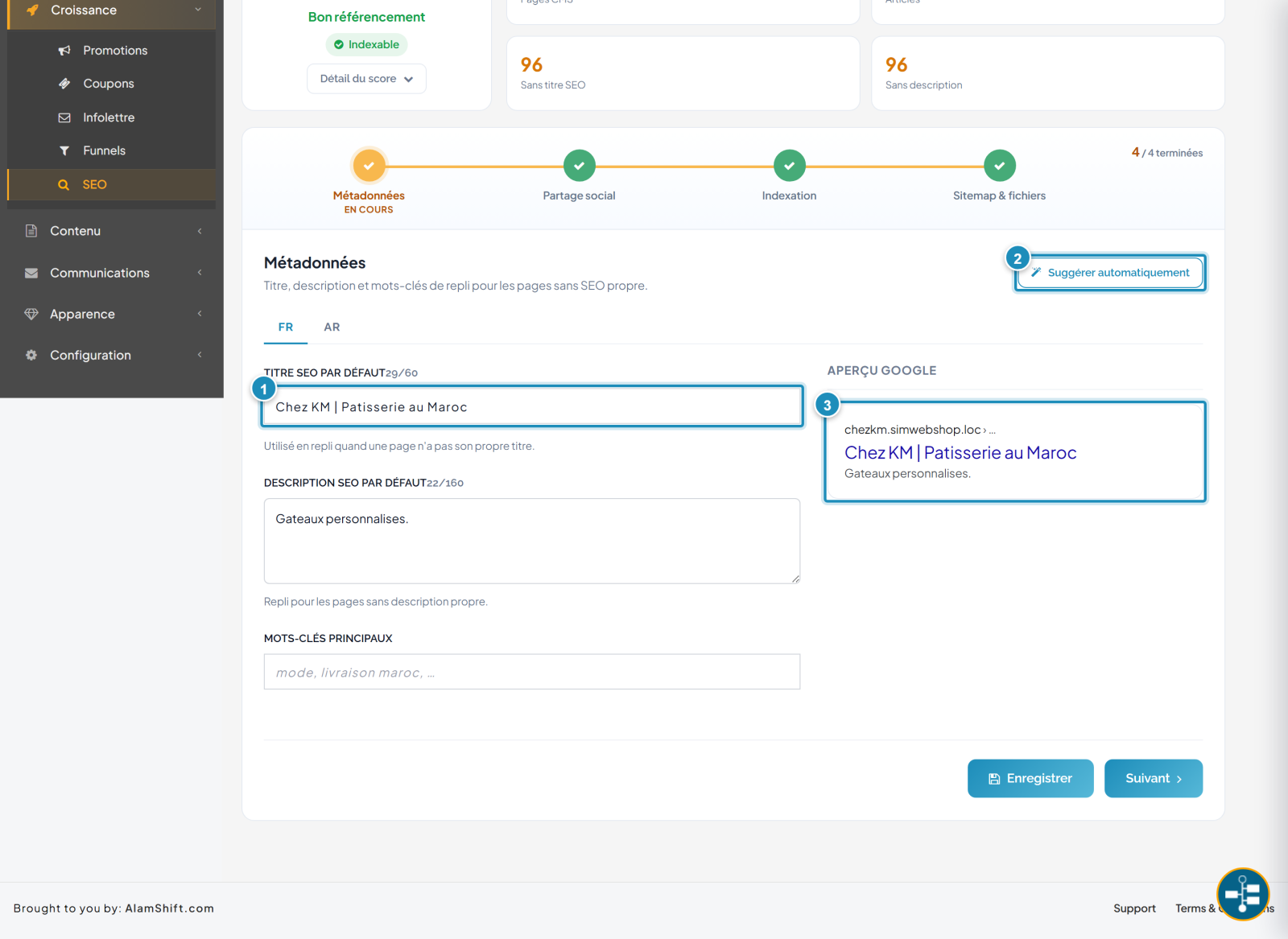
Below the track, the Metadata section defines the fallback title, description and keywords — used for every page that has no SEO of its own. Enter a default SEO title (marker ①) that's short and clear (ideally under 60 characters), then a default SEO description and main keywords. The Suggest automatically button (marker ②) generates a first proposal from your store. The Google preview (marker ③) shows a live rendering of your page in the results. Set each language via the tabs (FR, AR…), then click Save.
Expected result
Your pages without their own SEO inherit a polished fallback title and description, your score reflects the best practices applied, and the Google preview shows exactly what your future customers will see. The Social sharing, Indexing and Sitemap steps round out the setup.
Expert tips
- A unique title per key page. The fallback is a safety net; your best pages deserve their own SEO title (flagship product, key category).
- Write for humans. A description that makes people want to click beats one stuffed with keywords.
- Tackle the orange first. The "without title" / "without description" counters point to the highest-return effort.
- Mind social sharing. A clean share image improves clicks on social networks, not just on Google.
Common mistakes
| Mistake | Why it's a problem | The fix |
|---|---|---|
| Title too long | Google truncates it in the results. | Stay under ~60 characters (the counter guides you). |
| Same title everywhere | Your pages cannibalize each other on Google. | Give key pages their own title. |
| Empty description | Google invents a snippet, often poor. | Fill in the fallback description. |
| Metadata in one language only | Degraded local ranking. | Fill in every language tab. |
Frequently asked questions
Do I need to be an SEO expert to rank my store well?
No. SimWebShop applies the technical part automatically (URLs, tags, sitemap, structured data). You only need to polish your titles, descriptions and content.
What does the "Indexable" badge mean?
It confirms your store allows Google to index it. If it says otherwise, your store is in private/non-indexable mode — fix that before launch.
What is "Suggest automatically" for?
It generates a first proposal for the title and description from your store's information. Review and adjust: it's a starting point, not a final version.
How long before I appear in Google?
It depends on Google: from a few days to several weeks. An up-to-date sitemap (last step of the track) speeds up the discovery of your pages.
What's the difference between the fallback title and a page's title?
The fallback title applies to pages without their own SEO. As soon as a page (product, category) has its own SEO title, that one takes priority over the fallback.